

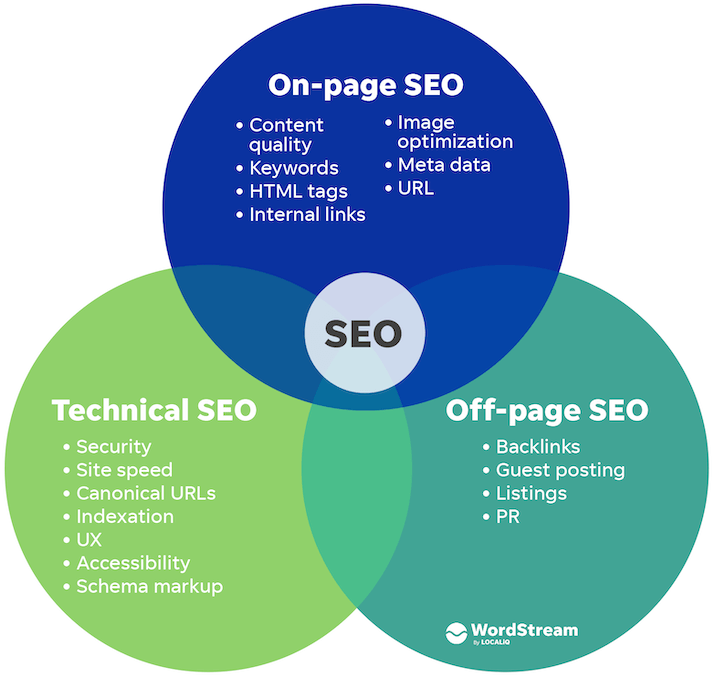
Technical SEO builds the foundation for your website by ensuring search engines like Google can easily crawl, index, and understand your site's content, which helps it rank higher in search results.
This is distinct from on-page SEO (content and keywords) and off-page SEO (backlinks), focusing instead on behind-the-scenes optimizations that make your site faster, secure, and user-friendly.
Why It Matters for Non-Technical Business Owners
Search engines use "spiders" or "crawlers" to scan your site and decide what to show in results. Poor technical setup means your pages get ignored, hurting visibility and traffic. Regular checks keep things running smoothly without needing coding skills—use free tools like Google Search Console.
Essential Technical SEO Fundamentals
Prioritize these beginner-friendly steps, explained simply with action items:
-
Site Speed and Core Web Vitals: Pages must load fast (under 3 seconds ideally) on desktop and mobile. Slow sites frustrate users and crawlers.
Action: Test with Google's PageSpeed Insights; compress images, minify code via plugins (e.g., for WordPress). -
Mobile-Friendliness: Ensure your site works seamlessly on phones, as Google prioritizes mobile-first indexing.
Action: Use Google's Mobile-Friendly Test tool. -
HTTPS Security: Switch to HTTPS (secure connection) to protect user data and boost trust signals.
Action: Get a free SSL certificate from your host and redirect HTTP to HTTPS. -
Crawlability and Indexing: Help crawlers find all your pages without errors.
Action: Create/submit an XML sitemap (via plugins like Yoast), set up robots.txt to guide (not block) crawlers, fix 404 errors in Google Search Console. -
Avoid Duplicate Content: Prevent identical pages from confusing search engines, which wastes "crawl budget" (limited pages crawled per visit).
Action: Use canonical tags for preferred versions, 301 redirects for old URLs, or noindex tags for low-value pages. -
Site Structure and URLs: Organize logically with short, descriptive URLs (e.g., /seo-tips vs. /post?id=123). Add breadcrumbs for navigation.
Action: Group related pages in categories; use silo structure. -
Structured Data (Schema Markup): Add code to highlight content like reviews or FAQs, enabling rich snippets (stars, prices) in results for more clicks.
Action: Use free plugins or Google's Structured Data Markup Helper; test with Rich Results Test.
Quick-Start Checklist
Use this table to audit your site—no tech expertise required:
| Priority | Check | Tool/Resource | Fix If Needed |
|---|---|---|---|
| High | HTTPS active? | Browser address bar | Enable SSL via host |
| High | Mobile-friendly? | Google Mobile-Friendly Test | Responsive theme |
| High | Fast load time? | PageSpeed Insights | Optimize images |
| Medium | XML sitemap submitted? | Google Search Console | Generate & submit |
| Medium | No crawl errors? | Google Search Console | Fix broken links |
| Medium | Structured data? | Rich Results Test | Add schema via plugin |
| Low | Duplicate content? | Site:yourdomain.com search | Canonical tags/redirects |
Next Steps
Start with a free technical audit in Google Search Console or tools like Screaming Frog (free tier). Schedule monthly checks, and hire a freelancer for complex fixes. These basics can improve rankings significantly over time.













Maple Ranking offers the highest quality website traffic services in Canada. We provide a variety of traffic services for our clients, including website traffic, desktop traffic, mobile traffic, Google traffic, search traffic, eCommerce traffic, YouTube traffic, and TikTok traffic. Our website boasts a 100% customer satisfaction rate, so you can confidently purchase large amounts of SEO traffic online. For just 720 PHP per month, you can immediately increase website traffic, improve SEO performance, and boost sales!
Having trouble choosing a traffic package? Contact us, and our staff will assist you.
Free consultation