

You should set threshold rules that detect meaningful, actionable changes in traffic or rankings while minimising false alerts. Below is a practical, step‑by‑step approach with concrete threshold strategies, tuning guidance, and example configurations you can apply to monitoring sudden traffic drops/spikes or ranking loss.
Direct answer (1–2 sentences)
- Use a mix of baseline (historical) — or dynamic — thresholds and static thresholds, plus multi‑condition rules (magnitude + persistence + context) so alerts fire only when a significant deviation from expected behaviour persists long enough to matter.
- Start with conservative sensitivity, then tune using alert rate, business impact and root‑cause clarity until alerts are actionable.
Essential context and recommended approach
- Choose the right threshold type
- Dynamic (baseline) thresholds: Compare current metric to a rolling historical baseline (e.g., 7–28 day moving average, time‑of‑week/seasonality aware). Dynamic thresholds reduce false positives for metrics with regular seasonality and are recommended for latency, traffic and ranking signals.
- Static thresholds: Use fixed absolute or percentage thresholds where business requirements demand hard limits (e.g., revenue pages must not drop below X visits per hour).
- Combine magnitude, direction and persistence
- Magnitude: require both a relative and absolute change before alerting (e.g., >= 30% drop AND >= 500 visits lost in 1 hour). This prevents tiny sites from noisy percent swings.
- Direction: separate rules for spikes vs drops — different root causes and responses.
- Persistence/time window: require the condition to hold for N consecutive checks or over a time duration (for example, 3 consecutive 5‑minute checks or a sustained 30 minutes). Many tools offer “consecutive polls” or “time duration” strategies to avoid transient alerts.
- Use multi‑condition/advanced rules
- Logical AND/OR across attributes (e.g., traffic drop AND error rate increase OR page load time spike) to surface incidents with high confidence.
- Include contextual filters: geography, device type, traffic source (organic vs paid), page/group of pages to isolate problems (example: organic ranking loss vs paid campaign issues).
- Implement escalation and severity tiers
- Warning (informational): smaller deviations or single‑location failures (e.g., 15% drop for 30 min).
- Critical: large or business‑impacting events (e.g., >= 50% drop or ranking loss for top 20 keywords for 60 min).
- Auto‑escalate if unresolved after a time threshold (e.g., escalate to on‑call after 30–60 minutes).
- Use historical baselines and presets wisely
- Use day‑of‑week and hour‑of‑day baselines for traffic and ranking metrics to account for regular patterns; use dynamic thresholds that learn from history (many network/monitoring products provide dynamic thresholds/presets).
- Start with medium sensitivity presets (if provided) and tune based on false positive rate and missed incidents.
- Specific examples (concrete rules you can copy)
- Sudden organic traffic drop (per site):
- Condition: Organic sessions for site fall >= 30% vs 7‑day moving average and absolute drop >= 300 sessions in last 60 minutes.
- Persistence: Condition holds for ≥ 2 consecutive 15‑minute checks (i.e., 30 minutes total).
- Context: Only from organic channel; exclude known maintenance windows.
- Severe traffic outage:
- Condition: Total sessions drop >= 80% vs same hour, previous week.
- Persistence: 3 consecutive 5‑minute checks.
- Action: Page‑public outage escalation (pager + postmortem).
- Ranking loss for priority keywords:
- Condition: >= 20% of tracked top‑100 keywords drop > 5 positions vs previous 24‑hour snapshot.
- Persistence: Confirmed in next daily crawl.
- Action: Notify SEO and Product teams; begin immediate investigation.
- Traffic spike detection (possible DDoS or bot):
- Condition: Incoming requests per second exceed baseline by >= 200% and error rate (5xx) increases by > 3%.
- Persistence: 3 consecutive 1‑minute checks.
- Action: Trigger WAF/edge protections and network team alert.
- Tune thresholds iteratively
- Start conservative (fewer alerts) and loosen sensitivity if you miss incidents, or tighten if you get too many false positives. Track two metrics during tuning: alert volume and mean time to detect/root cause.
- Use post‑incident reviews to update thresholds (identify cases where alerting was too slow or too noisy).
- Practical alert‑configuration tips (tool features to use)
- Use rolling baselines that consider time‑of‑week seasonality.
- Use composite rules / advanced thresholds to combine metrics (e.g., traffic + errors + latency).
- Configure “alert trigger interval” (consecutive polls) and “alert clear interval” to prevent flapping.
- Add suppression for scheduled maintenance windows and known promotional spikes.
- Add metadata/labels to alerts (region, product, service) to speed routing and reduce cognitive load for on‑call teams.
- Validation and KPIs to monitor your alerting system
- False positive rate (alerts that don’t need action).
- Mean time to acknowledge (MTTA) and mean time to resolve (MTTR) for incidents.
- Missed incident rate — track incidents discovered outside the alerting system.
- Alert fatigue (alerts per on‑call per shift) — aim for a sustainable number.
Additional implementation considerations
- For ranking/SEO monitoring, rely on frequent keyword crawls but require confirmation (e.g., two consecutive daily checks) before alerting to avoid SERP volatility false alarms.
- For network/traffic monitoring, many vendors expose threshold presets (high/medium/low sensitivity) and dynamic thresholds — use those as starting points and adapt by importance and stability of links.
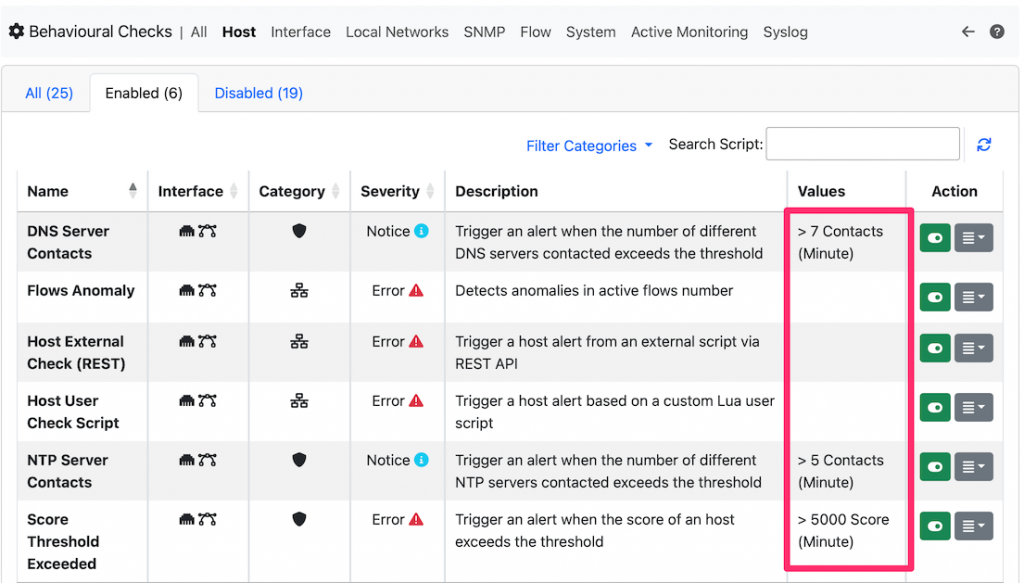
- Use both aggregate and per‑entity thresholds: global site traffic and per‑page or per‑host thresholds (ntop-style local rules let you define per‑host volume/throughput rules).
If you want, I can:
- Propose a ready‑to‑import rule set for a specific monitoring tool (give me the tool: e.g., Datadog, New Relic, LogicMonitor, Site24x7, Splunk).
- Generate threshold values tailored to your site size (small/medium/enterprise) and a sample alert escalation playbook.














Maple Ranking offers the highest quality website traffic services in Canada. We provide a variety of traffic services for our clients, including website traffic, desktop traffic, mobile traffic, Google traffic, search traffic, eCommerce traffic, YouTube traffic, and TikTok traffic. Our website boasts a 100% customer satisfaction rate, so you can confidently purchase large amounts of SEO traffic online. For just 720 PHP per month, you can immediately increase website traffic, improve SEO performance, and boost sales!
Having trouble choosing a traffic package? Contact us, and our staff will assist you.
Free consultation