

Detecting Visibility Suppression Using Google Search Console (GSC) and Index Checks
Visibility suppression—such as algorithmic demotions, penalties, or drops from AI Overviews and bot traffic changes—can be detected by monitoring discrepancies in GSC's Performance report (impressions vs. clicks/CTR), URL Inspection tool for indexing issues, and cross-referencing with manual checks.
Step 1: Analyze GSC Performance Report for Anomalies
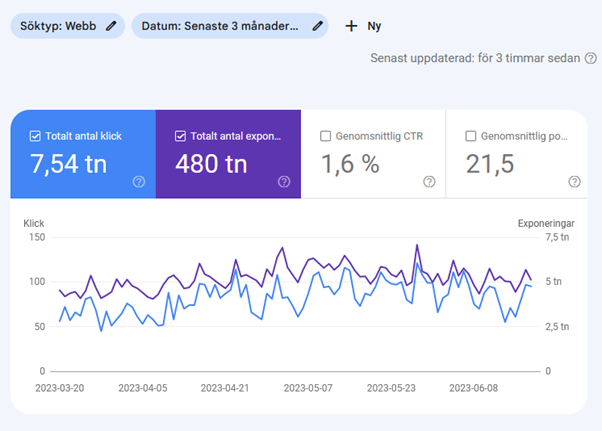
- Review total impressions, clicks, CTR, and average position over time periods; sudden impression spikes without click growth or CTR drops often signal suppression like AI Overviews merging into organic data (no segmentation available).
- Filter by queries, pages, countries, or devices to spot query-specific drops; algorithmic updates or suppression may cause visibility loss without alerts.
- Check for large impression increases when filtering by page (due to aggregation) vs. property-level drops, which can mask bot traffic changes (e.g., September 2025 GSC update removed bot filtering, inflating impressions).
- Compare trends across periods to detect algorithmic suppression (e.g., post-update ranking sinks) or penalties; no GSC notification for algorithmic ones.
Step 2: Use URL Inspection Tool for Index and Crawl Checks
- Enter URLs in the URL Inspection tool to verify:
Metric What It Reveals Suppression Indicator Crawl allowed? Yes/No/N/A based on robots.txt or blocks No = blocked visibility Page fetch Crawl success/failure Errors prevent indexing Indexability status Crawlable/indexable? No = suppression risk Rendered screenshot Googlebot's view JS errors or mismatches block content HTTP headers Status codes, noindex tags, cache rules Hidden noindex or stale content delays visibility Structured data Schema errors/warnings Blocks rich results, reducing exposure - Run live tests on updated pages to catch canonical conflicts, hreflang issues, or X-Robots-Tag noindex before re-crawl.
- Cross-check Manual Actions tab for explicit penalties (spam/links); algorithmic ones show as silent drops.
Step 3: Check Site-Wide Reports for Broader Suppression
- Pages report: Identify unindexable pages, crawl errors, or wasted crawl budget wasting visibility.
- Core Web Vitals/Mobile Usability: Fix load shifts or errors reducing eligibility.
- Social channels report (if available): Track verified social profiles separately; unverified ones create blind spots in brand searches.
- Monitor for non-search factors like AI Overviews (use manual SERP checks or tools like SerpApi for isolation) or recent changes (e.g., 2025 bot traffic drop).
Step 4: Validate with Manual Index Checks and External Monitoring
- Search
site:yourdomain.comin Google to confirm indexed pages; gaps indicate suppression. - Use incognito mode, VPN for locations, and screenshot tools to manually inspect SERPs for AI Overviews or ranking drops not reflected in GSC.
- Track traffic in Google Analytics alongside GSC; mismatches suggest suppression (e.g., algorithm devaluation ignoring content).
Limitations and Next Steps
GSC confirms technical eligibility but not quality/spam issues, live canonicals, or site-wide architecture—use crawlers for those. If drops persist post-fixes, submit for reconsideration or await algorithmic recovery (no guarantees). Regular weekly checks catch suppression early, as data lags 2-3 days.













Maple Ranking offers the highest quality website traffic services in Canada. We provide a variety of traffic services for our clients, including website traffic, desktop traffic, mobile traffic, Google traffic, search traffic, eCommerce traffic, YouTube traffic, and TikTok traffic. Our website boasts a 100% customer satisfaction rate, so you can confidently purchase large amounts of SEO traffic online. For just 720 PHP per month, you can immediately increase website traffic, improve SEO performance, and boost sales!
Having trouble choosing a traffic package? Contact us, and our staff will assist you.
Free consultation