

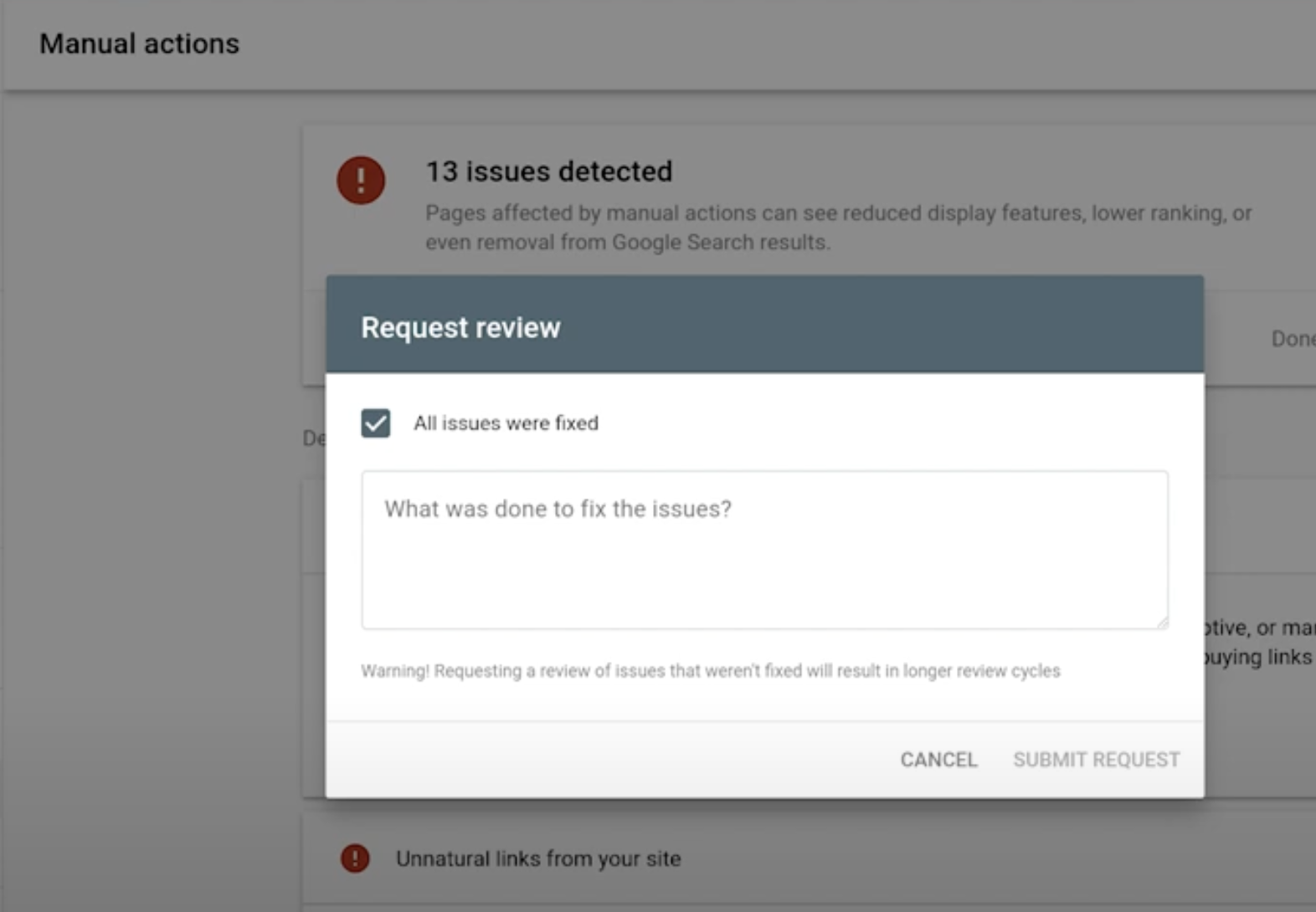
You should file a Google reconsideration request only when Google has applied a manual action or a security issue to your site and you have fully fixed the underlying problems; it’s submitted from the Manual Actions (or Security Issues) report in Google Search Console and must clearly document what you changed, how you fixed it, and what you will do to prevent recurrence.
Essential context and step-by-step guidance
-
When a reconsideration request is applicable
- Applicable: Google has notified you of a manual action or security issue in Search Console and the notification lists the type of penalty or affected pages; you must fix those issues before requesting review.
- Not applicable: If your traffic drop is caused by algorithmic updates (algorithmic ranking changes) or crawling/indexing problems not accompanied by a manual action or security notice, do NOT submit a reconsideration request — those are handled by different fixes (SEO improvements, content quality fixes, or submitting sitemaps/URL inspections), and submitting reconsideration will be ignored.
-
Preparation checklist (do these before you open the request)
- Read the Manual Actions (or Security Issues) message in Search Console and note the reason and sample URLs Google provided.
- Fully fix every listed issue (remove spammy links or disavow plus remove when possible; remove hacked content and malware; remove doorway or thin/auto-generated pages; remove hidden or deceptive content; fix unnatural outbound links, etc.) and verify fixes using logs, crawling tools and Search Console where applicable.
- Document exactly what you changed for each affected page or site-wide problem — include dates, actions, and who performed the work (in-house or an SEO vendor) and retain proof (screenshots, file hashes, server logs, change logs, exported lists of removed URLs, malware removal reports, or forensic scans).
- If links are involved, compile a complete link-removal log showing outreach attempts and results; if you used an SEO vendor, disclose them and describe their actions (Google recommends transparency here).
- Put preventive processes in place (new editorial guidelines, site moderation rules, QA checks, plugin/hardening schedules, vendor oversight, link-acquisition policy) and be ready to describe them.
-
How to write the reconsideration request (structure and tone)
- Submit from Search Console → Manual Actions (or Security Issues) → Request Review.
- Start with a concise acknowledgement: state you understand the manual action/security problem and apologize if appropriate — be factual and non-defensive.
- Explain root causes briefly: why the issue happened (e.g., third‑party SEO vendor purchased unnatural links; plugin vulnerability caused hacked pages), avoiding excuses but giving context.
- List specific fixes you completed: for each sample URL or issue type, describe the exact remediation (removed page X on YYYY‑MM‑DD; disavowed/removed N links; cleaned malware from directory /wp‑infected/; restored canonical content), and reference attached evidence if relevant.
- Provide evidence and attachments (as plain text or links to live documents) — include removal logs, spam‑link outreach messages, before/after screenshots, security scan reports, server logs showing cleanup timestamps, or lists of cleaned URLs.
- Describe long-term prevention: list new editorial policies, staff training, security hardening steps (patching, stronger passwords, 2FA, file integrity checks), monitoring cadence, and vendor oversight to prevent recurrence.
- Keep it concise, truthful, and well‑proofread; do not include extraneous links to non‑Google products — Google may not follow them.
-
Practical formatting and submission tips
- Use the Request Review text box in Search Console (plain text); you may include links to documents in Drive if necessary, but put the key facts in the message itself.
- Provide clear mapping: for each “sample URL” Google listed, show exactly what action you took and when (e.g., “Sample URL: /spam-page — removed 2025‑09‑10; 404 returned since; removal confirmed by Screaming Frog crawl on 2025‑09‑12”).
- For link penalties, include the outreach/removal table and note the domains you couldn’t reach and therefore disavowed.
- Only submit one request at a time; don’t resubmit while a review is pending — Google advises waiting for their reply.
-
What to expect after submission
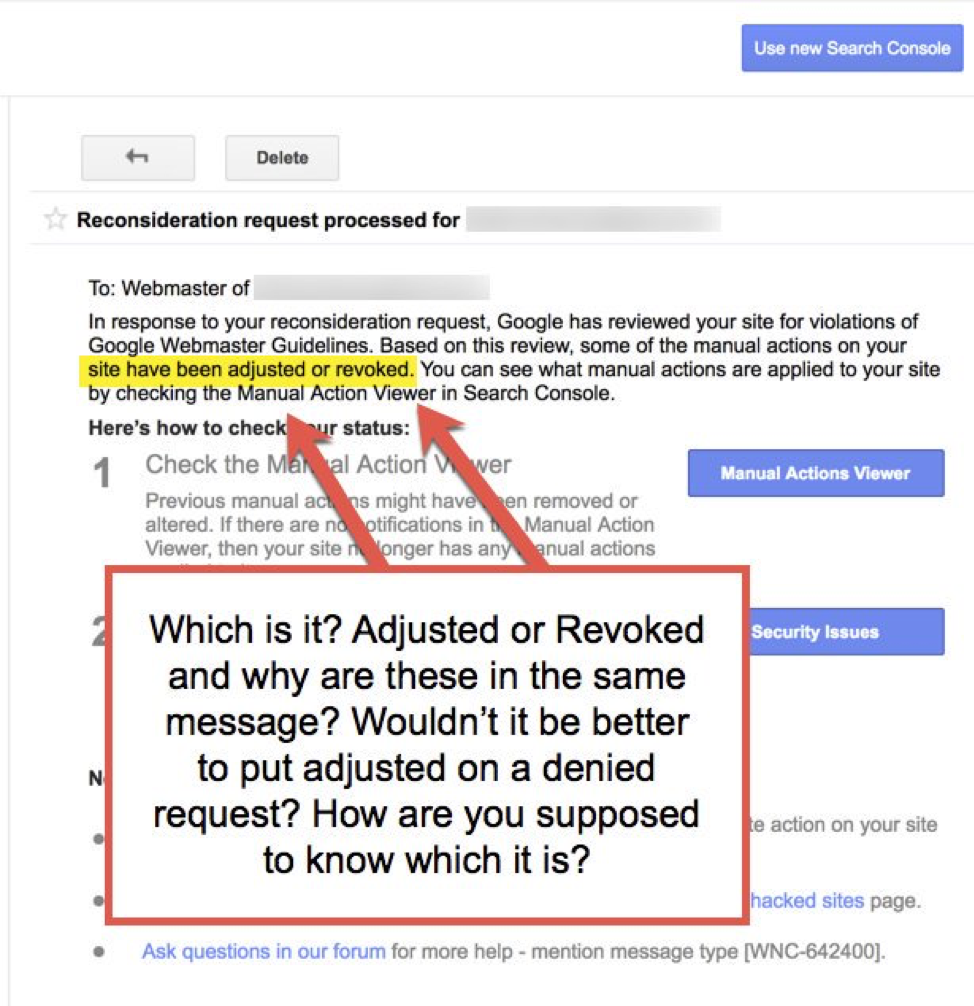
- Confirmation that Google received the request, followed by a review notification in Search Console; processing time varies (days to several weeks — sometimes longer).
- Outcomes: manual action revoked; manual action remains (with guidance to fix remaining issues); or no manual action found (if the notification was incorrect).
- If denied, address the remaining items Google mentions and resubmit once you have completed the additional fixes.
-
Common pitfalls to avoid
- Submitting before fixes are complete or without verifiable evidence (leads to denial).
- Giving vague promises (“we’ll follow guidelines”) without concrete changes and proof.
- Hiding use of an SEO vendor or being misleading — Google prefers transparency about third parties and what they did.
- Resubmitting repeatedly while a review is in process.
Example outline (concise text you can adapt for the Request Review box)
- Acknowledge: “We understand Google applied a manual action for [type], affecting [list or sample URLs]. We apologise and accept responsibility.”
- Root cause: “The issue occurred because [brief cause: e.g., legacy vendor built low‑quality links between 2023–2024].”
- Remediation (bullet list): “Actions taken: 1) Removed N spam pages (list); 2) Contacted X webmasters and secured Y removals; 3) Disavowed Z domains (link to disavow file); 4) Cleaned malware and changed all credentials (scan report attached).”
- Evidence: “Attached: removal log, before/after screenshots, server logs, security scan results.”
- Preventive measures: “New editorial policy, monthly QA audits, vendor oversight, hardening steps (patch schedule, 2FA), and a dedicated content review board.”
- Closing: “We request review. We believe the site now complies with Google’s Webmaster Guidelines and we’ve taken steps to prevent recurrence.”
When a reconsideration request is NOT the right step (short recap)
- No manual action or security notice in Search Console (traffic drop from algorithmic changes) — improve content, authority, and technical SEO instead.
- The issue is ongoing and you have not completed verifiable fixes — wait until you can prove remediation.
Primary official sources and practical guides to follow (for reference while you prepare)
- Google Search Console Manual Actions and Reconsideration help pages — authoritative instructions on how to submit and what to include.
- Practical how‑to guides and templates from SEO experts (Search Engine Journal, Bruce Clay, Loganix) for structuring your request and documenting link removals or security cleanups.
If you’d like, I can:
- Draft a concise Request Review message tailored to your specific manual-action type (link spam, hacked site, thin content, etc.) using the exact sample URLs and remediation evidence you provide.
- Or review a draft reconsideration message and suggest improvements to increase the chance of approval.
Which would you prefer, and please tell me the manual action type and any sample URLs or the remediation evidence you already have?















Maple Ranking offers the highest quality website traffic services in Canada. We provide a variety of traffic services for our clients, including website traffic, desktop traffic, mobile traffic, Google traffic, search traffic, eCommerce traffic, YouTube traffic, and TikTok traffic. Our website boasts a 100% customer satisfaction rate, so you can confidently purchase large amounts of SEO traffic online. For just 720 PHP per month, you can immediately increase website traffic, improve SEO performance, and boost sales!
Having trouble choosing a traffic package? Contact us, and our staff will assist you.
Free consultation