

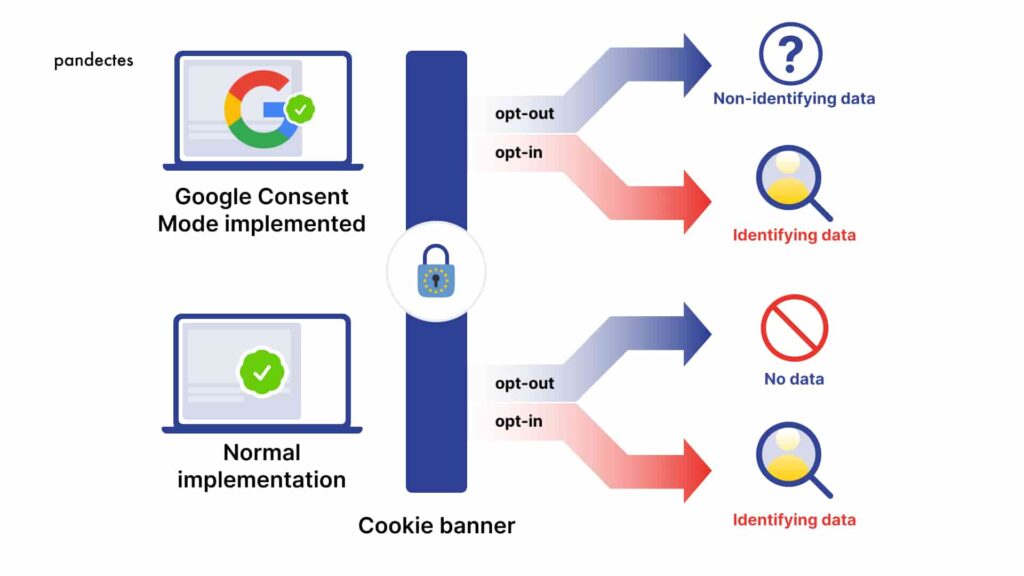
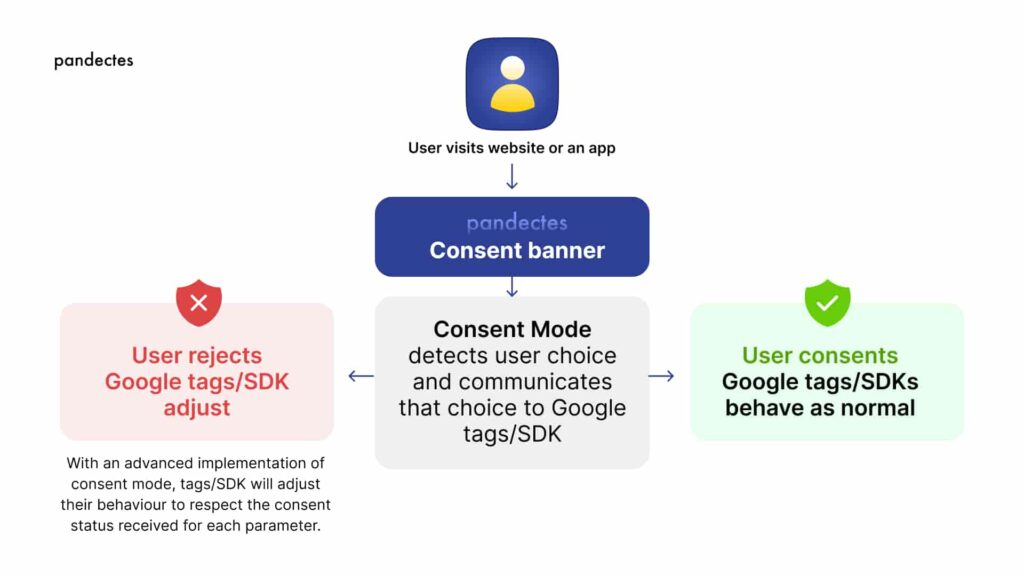
Google Analytics 4 (GA4) Consent Mode enables enterprises to comply with data privacy regulations like GDPR by sending consent signals that adjust data collection, anonymize unconsented data via modeling, and support ad personalization for EEA users. It distinguishes between Basic Consent Mode (sends consent parameters without altering data transmission, enabling quick compliance and conversion modeling) and Advanced Consent Mode (sends both consented and unconsented data for full behavioral and conversion modeling, recovering up to 70% of lost attribution).
Key Consent Parameters (Consent Mode v2, Mandatory from March 2024)
Google requires six parameters for EEA traffic:
- ad_storage, ad_user_data: For ad tracking and personalization.
- analytics_storage: For GA4 analytics.
- functionality_storage, personalization_storage, security_storage: For site features and security.
Unconsented data uses cookieless pings for anonymous collection, with machine learning modeling based on consented user patterns.
Step-by-Step Setup for Enterprises (Using Google Tag Manager - GTM)
Enterprises typically integrate a Consent Management Platform (CMP) like OneTrust or Cookiebot with GTM for scalability.
- Enable Consent Overview in GTM: Log into GTM > Admin > Container Settings > Check "Enable consent overview" > Save. This visualizes tag consent needs.
- Set Default Consent to 'denied': Add a Consent Initialization tag firing on "All Pages" via gtag:
This ensures privacy-safe defaults before user interaction.gtag('consent', 'default', { 'ad_storage': 'denied', 'analytics_storage': 'denied', // Include all six parameters }); - Configure Consent Initialization Trigger: Triggers > New > "Consent Initialization" > All Pages > Save. Fires before tags load.
- Integrate CMP: Link CMP to GTM to update consent on user choice (e.g.,
gtag('consent', 'update', { ... })). Persist choices in local storage. - Deploy GA4 Tags: Configure tags to require consent (e.g., analytics_storage for GA4). Test in GTM Preview.
| Basic vs. Advanced Mode | Data Sent | Modeling Benefits | Best For |
|---|---|---|---|
| Basic | Consented only + parameters | Conversion modeling | Quick EEA compliance without CMP changes |
| Advanced | Consented + anonymized unconsented | Behavioral + conversion (up to 70% recovery) | Enterprises maximizing data |
Verification and Enterprise Considerations
- In GA4: Check data stream for "Receiving Consent Signals" (active after ~48 hours).
- Use GTM Consent tab or GA4 icons to distinguish modeled (estimated) vs. observed data.
- Privacy Notes: Consult legal experts; GDPR compliance of modeling is debated. Tailor to enterprise CMP for multi-site scale.
- For ads/remarketing: Required for EEA; non-compliance risks feature limits.
















Maple Ranking offers the highest quality website traffic services in Canada. We provide a variety of traffic services for our clients, including website traffic, desktop traffic, mobile traffic, Google traffic, search traffic, eCommerce traffic, YouTube traffic, and TikTok traffic. Our website boasts a 100% customer satisfaction rate, so you can confidently purchase large amounts of SEO traffic online. For just 720 PHP per month, you can immediately increase website traffic, improve SEO performance, and boost sales!
Having trouble choosing a traffic package? Contact us, and our staff will assist you.
Free consultation